Clock Picker
The Clock Picker is a specialized field type to select time in analog or interactive clock picker components. This guide details the configuration options available to customize the Clock Picker field type according to your requirements.
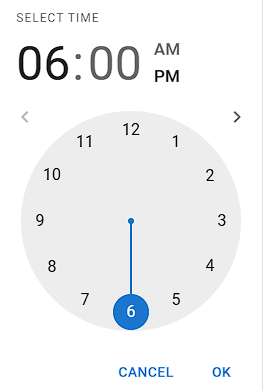
Field Options
| Option | Description | Example |
|---|---|---|
| Clock Time Format | Specifies the format for displaying the selected time. | hh:mm:ss A for a 12-hour format with AM/PM display. |
| Clock Picker Library Name | Selects the time selection library or component used for the Clock Picker field. | Choose from predefined libraries or "Other" for custom configurations. |
| Clock Hand Selector Address | CSS selector identifying the clock hand element used for selecting time components in custom clock implementations. | .clock-hand, .MuiClockPointer-thumb |
| Clock Meridiem List Selector Address | CSS selector for the element managing AM/PM selection in the Clock Picker field. | .meridiem-toggle, [data-am-pm] |
| Active Clock Components | Defines the components (hours, minutes, seconds, meridiem) that are enabled in the Clock Picker field. | Select hours, minutes, meridiem and seconds. |
| Address of the button to open the clock | CSS selector for the button that triggers the clock interface for selecting time. | #openTimePicker, .clock-trigger |
| Enter Timer Submit Button Selector Address | CSS selector for the submit button used to confirm the selected time in the Clock Picker field. | .clock-submit, button.confirm-time |
Additional Options
- Enable Button to Open Clock: Activates the specified button to open the clock interface.
- Submit Button After Time Selection: Automatically submits the selected time into the form when enabled.
Clock Picker Library Name
- MUI-V4 Time Picker
- MUI-X Time Picker (React)
- Other (Custom)
Examples of Clock Picker Libraries
- MUI-X React Time Pickers
- MUI-X Time Picker Available Components
- MUI v5 Time Picker Component
- ClockPicker on GitHub
- Buefy Clockpicker
Next Steps
 Field Types — Learn about different field types
 Field Response Actions — Configure response behaviors
 Excel Template — Prepare Excel (.xlsx) templates
 Site Settings — Configure site-wide automation settings