Special Key
Special key is used for some special work, such as what to do if your form gets filled or what to do after the entry is saved, all these work is done by the special key.
Insert Key
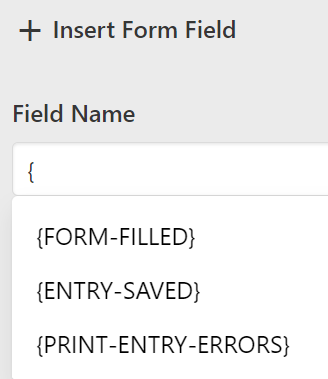
If you type { character in the Field Name field, then you will see the names of all the special keys in which you can use any one according to your work.
Public Keys
You can insert public special key but you cannot insert private special key. Private key only inserts extension.
| Key Name | Key Description |
|---|---|
| {FORM-FILLED} | After filling the form successfully, what you have to do, you can do by this key. |
| {ENTRY-SAVED} | After the success response matched then this key executes before response action. |
| {ENTRY-FAILED} | After the error response matched then this key executes before response action. |
| {ENTRY-ALL-DONE} | After all excel entries completed then trigger this key. |
| {PRINT-ENTRY-ERRORS} | If you want to see the errors after filling the form, then this has to be inserted. |
| {FORM-SKIP-ELEMENT-NOT-EXISTS} | If the target element is not found in the page then quits the current form and starts doing the next form. (Skip the current form if it not matches the additional settings) |
| {FORM-SKIP-ELEMENT-EXISTS} | If the target element is found in the page then quits the current form and starts doing the next form. (Skip the current form if it matches the additional settings) |
INFO
- If using
{PRINT-ENTRY-ERRORS}key is not working, firstly add{FORM-FILLED}key in form then use it. - If you are using
{ENTRY-ALL-DONE}key then turnoffsite setting Stop Filler on Missing Data. - If using
{ENTRY-ALL-DONE}predefined key and seeing the field response'IGNORE PREDEFINE KEY', it is not a problem. While Excel entries are still remaining, this key displays this message and will automatically execute when all entries are completed.
Private Keys
| Key Name | Key Description |
|---|---|
| {IS-ENTRY-SAVED} | if excel entry completed. |
| {ENTRY-COMPLETED-TIME} | Entry completion time. |
| {FORM-01-SUCCESS}, {FORM-02-SUCCESS}, .. | Store entry success message |
| {FORM-01-ERROR}, {FORM-02-ERROR}, .. | Store entry error message |
| {ROW-TYPE-FIELD-DUPLICATE-VALUES} |