Digital Clock Picker
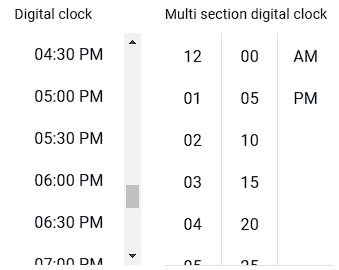
The Digital Clock Picker is a specialized field type that allows users to select time in a digital clock format.
Field Options
| Option | Description | Example |
|---|---|---|
| Digital Clock Time Format | Specifies the format for displaying the selected time. | hh:mm:ss A for a 12-hour format with AM/PM display. |
| Digital Clock Picker Library Name | Selects the time selection library or component used for the Digital Clock Picker field. | Choose from predefined libraries or "Other" for custom configurations. |
| Clock Hours List Selector Address | CSS selector for the element listing hours in the Digital Clock Picker. | ul.hours-list li, .MuiMultiSectionDigitalClockSection-item |
| Clock Minutes List Selector Address | CSS selector for the element listing minutes in the Digital Clock Picker. | ul.minutes-list li |
| Clock Seconds List Selector Address | CSS selector for the element listing seconds in the Digital Clock Picker. | ul.seconds-list li |
| Clock Meridiem List Selector Address | CSS selector for the element managing AM/PM selection in the Digital Clock Picker. | .meridiem-list li, [data-meridiem] |
| Active Clock Components | Defines the components (hours, minutes, seconds, meridiem) that are enabled in the Digital Clock Picker field. | Select hours, minutes, meridiem, and seconds. |
| Address of the Button to Open the Clock | CSS selector for the button that triggers the Digital Clock Picker interface for time selection. | #openDigitalClock, .time-picker-btn |
| Enter Timer Submit Button Selector Address | CSS selector for the submit button used to confirm the selected time in the Digital Clock Picker field. | .clock-submit, button.confirm-time |
Additional Options
- Enable Button to Open Clock: Activates the specified button to open the digital clock interface.
- Submit Button After Time Selection: Automatically submits the selected time into the form when enabled.
Clock Picker Library Name
- MUI-X Digital Clock Picker (React)
- Other (Custom)
Examples of Digital Clock Picker Libraries
Explore the available components and settings for different digital clock picker libraries:
Next Steps
 Field Types — Learn about different field types
 Field Response Actions — Configure response behaviors
 Excel Template — Prepare Excel (.xlsx) templates
 Site Settings — Configure site-wide automation settings