Loop
Loops execute a segment multiple times. Loops are ideal when you need to repeat a sequence of automated actions iteratively across table rows, list items, or counter values. You can also use Loop Variables to access information about the current iteration.
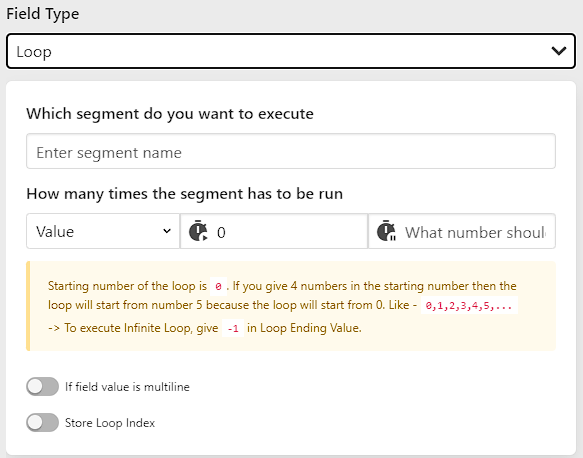
Options Overview
| Option | Required | Description |
|---|---|---|
| Which segment do you want to execute | Yes | The name of the segment to run in each iteration. |
| How many times the segment has to be run | Yes | Set loop duration via fixed Value or dynamic Element Length count. |
| If field value is multiline | No | Process multiline data by running one iteration per line. |
| Character that splits field value into multiline | No | Delimiter character to split multiline values (e.g., \r\n, ,). |
| Store Loop Index | No | Persists loop progress across page reloads/refreshes. |
| Delete store loop index data before execution of last index of loop | No | Automatically clears stored index data right before the final iteration. |
Which segment do you want to execute
Enter the name of the segment to execute in each loop cycle.
Dynamic Segment Names: You can use loop variables within the segment name to dynamically execute different segments in each iteration:
- Example:
segment-{{loop.index[FieldName]}} - Resolves to:
segment-1,segment-2,segment-3, etc.
Using Loop Index in Query Selectors
When automating repetitive tables, lists, or grids, you can use {{loop.index[FieldName]}} directly inside the CSS selector or XPath query of fields within the loop segment to target elements dynamically.
CSS Selector Comparison
Normal Static Selector (targets only row 1):
csstable tbody tr:nth-child(1)Dynamic Selector with Loop Index (targets each row sequentially):
csstable tbody tr:nth-child({{loop.index[FieldName]}})
XPath Comparison
Normal Static XPath:
text//table/tbody/tr[1]/td[2]/inputDynamic XPath with Loop Index:
text//table/tbody/tr[{{loop.index[FieldName]}}]/td[2]/input
1-Based vs 0-Based Indexing
CSS :nth-child() and XPath index positions are 1-based (the first element is index 1). When targeting :nth-child(index) using {{loop.index[FieldName]}}, configure your loop starting index to 1 or use 1-based loop variables ({{loop.iteration[FieldName]}}).
How many times the segment has to be run
You can control loop iterations using either Value or Element Length:
1. Value Mode
Specify fixed numerical bounds for the loop:
- Start Index: Starting number of the loop (
0by default). - End Index: Ending value for the loop.
- Infinite Loop: Enter
-1as the End Index to run continuously until stopped.
Loop Starting Counter
The loop counter starts at 0 by default (0, 1, 2, 3, 4, ...). If Start Index is set to 4, the loop begins at 4.
Stopping or Skipping Infinite Loops
When running an infinite loop (-1), stop or skip cycles using:
- Field Success Response Action set to Stop Loop or Skip Segment.
- Field Error Response Action.
- String Matching field comparing
Loop Indexto target values.
2. Element Length Mode
Runs the loop based on the number of matching elements found on the page.
Use Selectors Only
In Element Length mode, only enter a CSS Selector or XPath query (e.g. table tbody tr). Do not enter numbers. The extension automatically counts matching elements and runs the loop that many times.
Example:
- Selector Query:
table tbody tr - If 10 rows exist on the page, the loop automatically runs 10 times.
Multiline Field Values
- If field value is multiline: When enabled, the loop splits the field's data string into multiple lines and processes one line per iteration.
- Character that splits field value into multiline: Delimiter character used to split entries (use
\r\nfor newline-separated data, or,/;for delimited strings).
Store Loop Index Across Page Refreshes
- Store Loop Index: Enable this if form actions cause a full page refresh during a loop cycle. The extension stores the current iteration index in browser storage so execution resumes from the saved index rather than starting over from 0.
- Delete store loop index data before execution of last index of loop: Automatically clears the stored progress before running the final iteration to keep storage clean for subsequent runs.