Video
The <video> HTML element embeds a media player. You can control video playback through this field type.
Options
| Option | Description |
|---|---|
| Play/Pause | Toggle playback or pause the video |
| Playback Speed | Adjust video playback rate (e.g., 1.0, 1.5, 2.0) |
Autoplay Video - Sound Permission Required
If you want video to play automatically, you must turn on sound permission for the site.
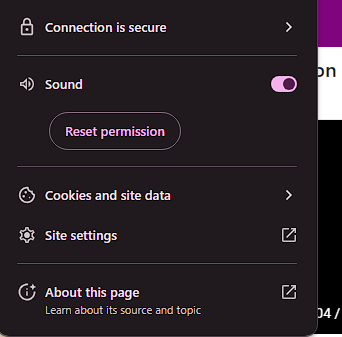
Without sound permission enabled, browsers will block autoplay functionality to prevent unwanted audio from playing.
Next Steps
 Field Types — Learn about different field types
- Field Settings — Advanced field configuration
 Excel Template — Prepare Excel (.xlsx) templates
 Site Settings — Configure site-wide automation settings